Tesla VIN Decoder: How to Decode Any Tesla VIN Number
A Tesla VIN looks like any other 17-character code. Decode it, though, and it tells you more than most carmakers' VINs do: which factory built the car, how it is powered, and on some builds even the battery chemistry.
What it won't tell you is just as important. It doesn't show the trim, whether Full Self-Driving is included, or the month the car was built. Plenty of used-Tesla buyers learn that after they've paid.
Want the fast route? Paste the VIN into the free VIN search on VINspectorAI to decode it and check recalls and title status. Keep reading if you want to understand every character yourself.
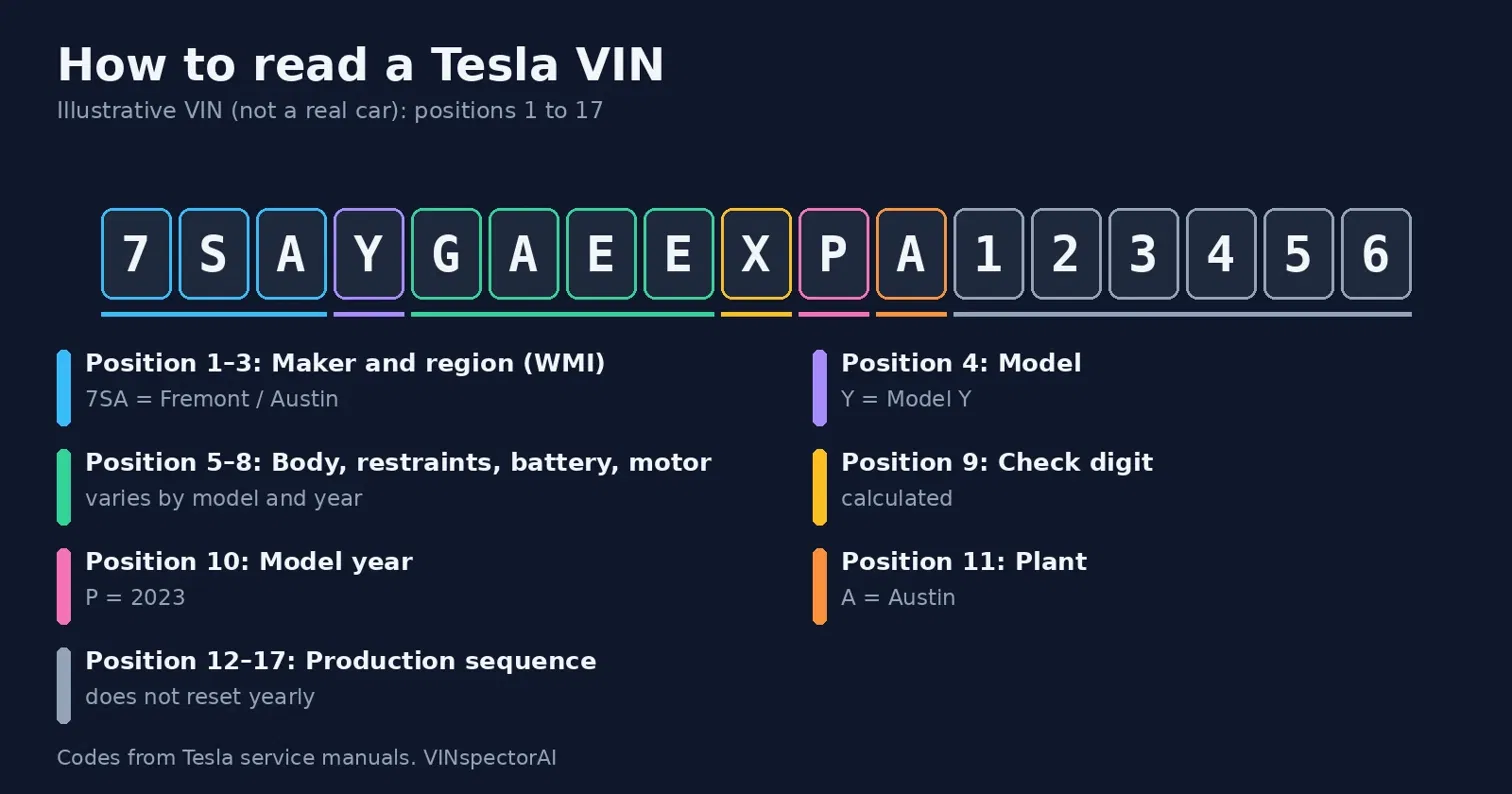
Quick answer: A Tesla VIN has 17 characters. Positions 1–3 identify the maker and region (5YJ, 7SA, LRW or XP7). Position 4 is the model (S, 3, X or Y). Positions 5–8 describe body, restraints, powertrain and motor. Position 9 is a check digit, position 10 is the model year, position 11 is the factory, and positions 12–17 are the production sequence number.
Where Is the VIN on a Tesla?
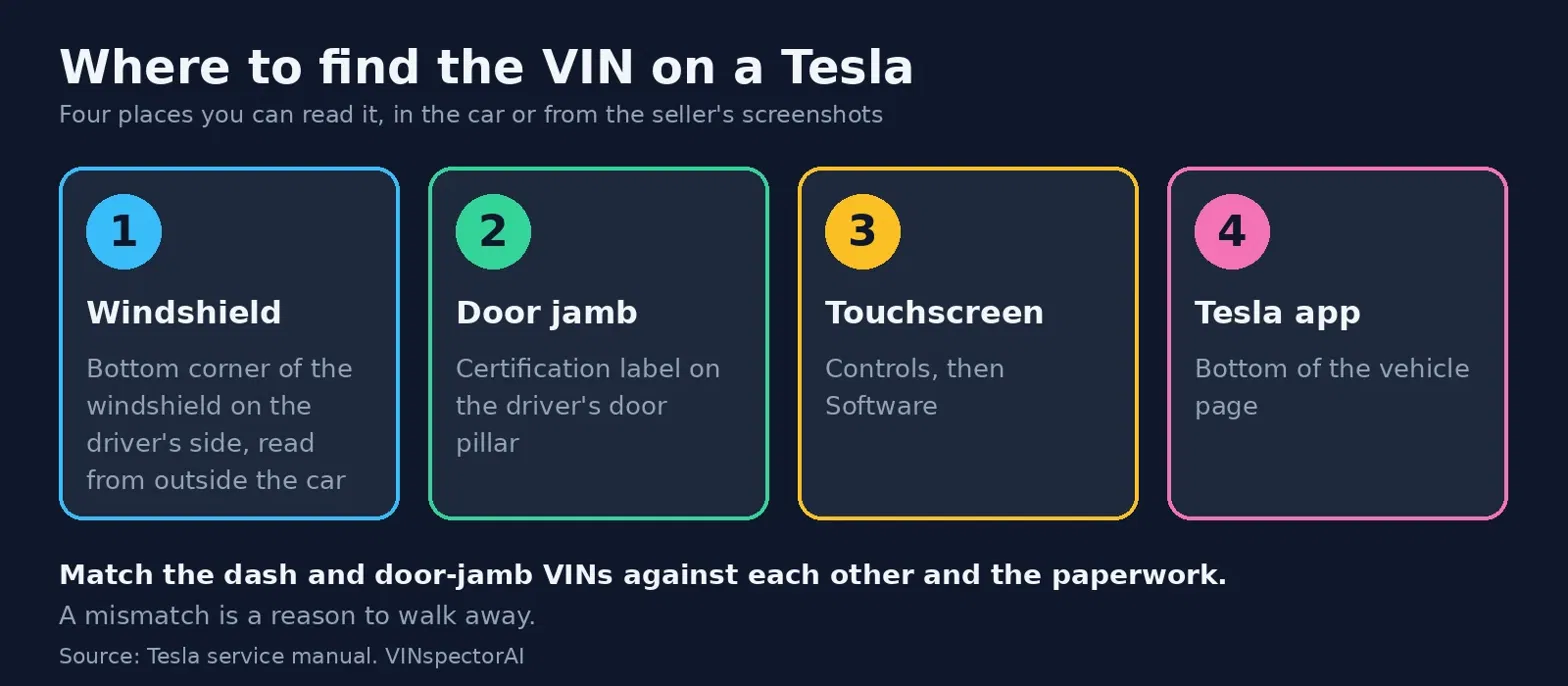
The VIN is on a plate at the bottom corner of the driver's side windshield and on the certification label on the driver's door jamb. You can also read it on the touchscreen under Controls, then Software, and in the Tesla mobile app.
Tesla puts the VIN in more places than most manufacturers. According to Tesla's own service manual, you can read it without opening the hood or digging through paperwork.
On the Dashboard, Through the Windshield
Stand outside the car and look through the bottom corner of the windshield on the driver's side. The VIN is on a plate at the top of the dashboard. This is the quickest check when you are looking at a car on a lot, and it is the one to compare against the listing.
On the Driver's Door Jamb
Open the driver's door. The certification label on the door pillar shows the VIN. On Model 3 and Model Y it is part of the product plate, visible when the front passenger door is open too.
On the Touchscreen or in the Tesla App
On the touchscreen, tap Controls, then Software. The VIN is listed there. The Tesla mobile app also shows it at the bottom of the vehicle page, which helps when a seller sends screenshots instead of letting you inspect the car.
Other Places Worth Knowing
An OBD-II reader plugged in under the driver's side of the dash can read the VIN electronically. Cars built in Shanghai or Berlin have extra locations, such as under the right front seat or on the right rear door sill. The VIN also appears on the registration, insurance card and title, and on the original window sticker if the owner kept it.
Check that the VIN on the dash and the door jamb match each other and the paperwork. A mismatch is a reason to walk away. The dashboard plate is the easiest one to reach, so it is also the easiest to tamper with; our guides to fake VIN numbers and VIN cloning cover the warning signs.
What Does Each Character in a Tesla VIN Mean?
Positions 1–3 name the maker and plant region, position 4 the model, and positions 5–8 the body, restraints, battery and motor. Position 9 is a check digit, position 10 the year, position 11 the factory, and positions 12–17 the production number.
The structure follows the standard 17-character format, but the codes in positions 4–8 are Tesla's own. If you need the general rules first, start with our guide on how to decode a VIN number.
Positions 1–3: World Manufacturer Identifier (WMI)
These three characters identify the manufacturer and where the car was built. Tesla uses four prefixes on current cars, as listed in the Model 3 and Model Y service manuals.
WMI | Plant / region | Models and notes |
|---|---|---|
5YJ | Fremont, California | Model S, 3, X and Y; Model Y only through model year 2021 |
7SA | Fremont and Austin | Model Y from model year 2022 onward |
LRW | Giga Shanghai, China | Model 3 and Model Y built in China |
XP7 | Giga Berlin, Germany | Model Y built in Germany |
The switch from 5YJ to 7SA on the Model Y catches people out. A 2022 Model Y that starts with 7SA is not a "different" or suspicious VIN. It is how Tesla's own manual says the Model Y is coded from that year.
Position 4: Model Line
The fourth character names the model: S for Model S, 3 for Model 3, X for Model X, and Y for Model Y. If this letter disagrees with the model in the listing, ask why before anything else.
What Is the VIN Prefix for a 2026 Tesla Model Y?
A 2026 Model Y built in Fremont or Austin starts with 7SAY and has T as the tenth character. Shanghai-built cars start with LRWY and Berlin-built cars with XP7Y, and their tenth character is also T when the car was built in 2026.
Positions 5–8: Body, Restraints, Battery and Motor
These four characters hold the most useful details, and they change by model and year. Treat the examples below as samples from Tesla's manuals, not a universal key.
Position | What it describes | Examples from Tesla's manuals |
|---|---|---|
5 | Body type and steering side | Model 3: E = sedan, left-hand drive; F = right-hand drive. Model Y: G = left-hand drive; H = right-hand drive |
6 | Seatbelt and airbag setup | Letters or numbers that vary by market and seating layout |
7 | Battery / fuel type | E = electric (lithium-ion on China builds); F = lithium iron phosphate (LFP), China-built Model Y and Model 3 |
8 | Motor / drive unit | Model Y: D = single motor, E = dual motor, F = dual motor performance. Model 3 (2024+): A = single, B = dual, T = dual performance |
One detail matters for used buyers. Position 7 separates LFP from lithium-ion cars only on China-built vehicles. On Fremont and Austin cars it just says "electric," so the VIN alone can't tell you the battery chemistry there.
Position 9: The Check Digit
Position 9 is a calculated character, not a feature code. Tesla's manual describes it as the result of a formula using every other character in the VIN. It exists to catch typos and forged VINs, and a wrong check digit means the VIN is mistyped or altered.
Position 10: Model Year
The tenth character is the year letter. Tesla uses the standard code, which skips I, O, Q, U and Z.
Letter | Model year | Age in 2026 |
|---|---|---|
L | 2020 | 6 years |
M | 2021 | 5 years |
N | 2022 | 4 years |
P | 2023 | 3 years |
R | 2024 | 2 years |
S | 2025 | 1 year |
T | 2026 | New |
There is a Tesla-specific twist. For Fremont and Austin cars, position 10 is the model year. For cars built in Shanghai and Berlin, Tesla's manual says it is the calendar year in which the car was built. Two cars with the same letter can therefore be slightly different ages depending on the plant.
Position 11: Assembly Plant
The eleventh character names the factory.
Letter | Plant | Matching WMI |
|---|---|---|
F | Fremont, California | 5YJ or 7SA |
A | Austin, Texas (Giga Texas) | 7SA |
C | Shanghai, China | LRW |
B | Berlin, Germany | XP7 |
If the plant letter and the WMI don't agree, the VIN may have been altered or mistyped.
Positions 12–17: Production Sequence
The last six characters are a running production number starting at 000001. Tesla's manual notes the count does not restart each model year, so a low number does not mean an early-year build.
How Do You Decode a Tesla VIN Step by Step?
Read it left to right in fixed blocks: maker and region, model, body and powertrain, check digit, year, plant, then serial number. The worked example below shows the result for one illustrative VIN.
You can run the same decode on a real VIN with our free VIN check, and cross-check the result with NHTSA's free vPIC decoder.
The VIN below is illustrative: it follows Tesla's published structure, but it is not a real car, and its check digit is a placeholder.
7SAYGAEEXPA123456
Reading It Left to Right
7SA means Tesla, built in Fremont or Austin, which for a Model Y points to model year 2022 or later.
Y is the Model Y.
G is a five-door left-hand-drive body.
A is a restraint configuration.
E means electric.
E (position 8) is a dual-motor standard setup.
X is the placeholder check digit.
P is model year 2023.
A is the Austin plant.
123456 is the production sequence.
The result: a 2023 Model Y, dual motor, built in Austin, left-hand drive.
Common Decoding Mistakes
Three errors show up again and again. People read position 10 as the build date, when it is only the year code. They assume every letter in positions 5–8 has one meaning across all models, when Tesla reuses letters differently on each model. And they treat a clean decode as a clean car. A decode only confirms how the car left the factory, which is the point our piece on VIN decoder myths makes for every brand.
What Can't a Tesla VIN Tell You?
A Tesla VIN does not show the build month, trim, paint, Autopilot hardware, Full Self-Driving, battery capacity or accident history. Those details sit in the door-jamb label, the window sticker, the in-car software screen, your Tesla account and a VIN history report.
This is where used-Tesla buyers get surprised, because Tesla's options and software are largely outside the VIN.
What you want to know | In the VIN? | Where to find it |
|---|---|---|
Build month | No, only the year letter | Label on the driver's door jamb |
Trim, paint color, wheels | No | Original window sticker or Tesla account |
HW3 vs HW4 Autopilot computer | No | In-car software information screen |
Full Self-Driving purchased | No | Window sticker, Tesla account, or written confirmation from the seller |
Battery capacity and health | No (chemistry only on China builds) | In-car energy screen, Tesla service check |
Accidents, title brands, odometer | No | A VIN history report |
Build Month
Tesla's VIN carries a year letter but no month. The build month is printed on the label on the driver's door jamb, and it matters for recalls that target a specific production window.
Trim, Color and Options
Nothing in the VIN lists the paint, wheel size or interior. The original window sticker by VIN is the best record of how the car was configured when new.
Can You Tell if a Tesla Has HW3 or HW4 From the VIN?
No. The VIN does not identify the Autopilot computer, so check it in the car: Tesla's support page says to open Controls, then Software, then Additional Vehicle Information to confirm the computer type, which shows as HW3 or HW4.
Shoppers ask this one most, and model year is a poor shortcut because Tesla switched computers partway through production. The table below is a rough guide by model, taken from two independent guides that both call the dates approximate. Cars built near a boundary can be either, and factories switched in different months.
Model | HW4 starts around | Source |
|---|---|---|
Model S and Model X | February to March 2023 | TSLNA and Not a Tesla App |
Model Y, Fremont-built | Late May 2023 | TSLNA and Not a Tesla App |
Model Y, Austin-built | Later in 2023 | |
Model 3 | 2024 model year (the refreshed "Highland"); 2017–2023 cars have HW3 | TSLNA and Not a Tesla App |
As a second check when you can't get into the car, Not a Tesla App notes that HW4 cars have red-tinted front camera lenses and two front-facing cameras instead of three. Treat that as supporting evidence only, and confirm on the car's own screen.
Full Self-Driving and the VIN
Full Self-Driving is not encoded in the VIN, and it can be added or removed after delivery. If the listing says FSD is included, get it confirmed in writing.
Battery Capacity and Health
The VIN doesn't give battery size in kWh or tell you how much the pack has degraded. Treat range claims with caution, and verify range in real driving before you agree on a price.
How Do You Check a Used Tesla After Decoding the VIN?
Run a full VIN history check for accidents, title brands and odometer readings, then check open recalls. A decode confirms the car is what the listing says; a history check tells you what happened to it afterward.
What NHTSA Data Shows for Tesla
Our Tesla reliability data is built from official NHTSA records and was last refreshed in April 2026. Across the six Tesla models we track, owners have filed 5,059 complaints. The biggest single category is forward collision avoidance and automatic emergency braking, at 1,960 complaints, or about 24% of the total.
By model year, 2022 had the most complaints (983), followed by 2018 (963) and 2021 (806). Raw counts favor older, higher-volume years, so compare years carefully. Many Tesla issues are fixed with over-the-air updates rather than a shop visit, so check open recalls with Tesla's VIN recall search or NHTSA's recall lookup rather than assuming.
Salvage, Rebuilt and Flood-Damaged Teslas
Tesla's battery sits in the floor, which makes flood and crash damage especially costly. A salvage or rebuilt brand on the title is a serious flag. Read our guides on what a branded title vehicle is and what a clean title means before you negotiate. If the car came from a hurricane zone, check for flood damage too. An odometer that doesn't match the car's wear is another red flag; see the signs of odometer rollback.
Where the Car Was Registered
Where a Tesla has lived affects its history. California is home to the Fremont factory, and Texas to Giga Texas, so many used Teslas have title records in those states. State-specific checks help, such as a California VIN check, a Texas VIN check or a Florida VIN check, which is useful for cars that spent time in flood-prone areas.
Tesla VIN Lookup vs. Tesla VIN Check
A Tesla VIN lookup decodes the factory data in the VIN. A Tesla VIN check goes further and pulls accident records, odometer readings, open recalls and title status.
People use the two phrases loosely, but for a purchase you want both. VINspectorAI runs the history side on its Tesla VIN check page.
Looking at a different brand? We have decoder guides for the Ford VIN decoder, the Chevy VIN decoder and the BMW VIN decoder.
Before You Pay for That Tesla
Decode the VIN to confirm the model, motor and factory. Then run the full history, because a decode can't show accidents, title brands or odometer problems. Check the VIN on the dash and door jamb against the paperwork, and get FSD and hardware claims in writing.
Run the VIN through VINspectorAI before you hand over a deposit.
Frequently Asked Questions
Get answers to common questions about Tesla VIN Decoder: How to Decode Any Tesla VIN Number
Uncover Complete Vehicle History Reports
Discover critical vehicle information before you buy. Our VIN decoder reveals accident records, title status, recalls, and service history to help you make informed decisions.